
Accounting settings can be set on the Accounting page. You can access this page by navigating to Setup -> Options -> Accounting.
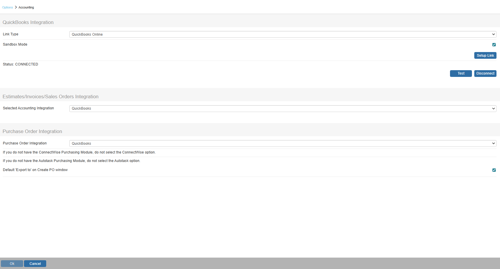
On this page you can set up your QuickBooks Online integration by selecting QuickBooks Online from the Link Type dropdown and clicking on [Setup Link]. This will bring you to the QuickBooks Online Setup window. For instructions on how to set up this integration please see the How Do I Setup the QuickBooks Online Integration? help article.
Sandbox Mode
Selecting this option will enable the connection in sandbox mode. This is a useful setting for testing the integration.
Estimates/Invoices/Sales Orders Integration
With this drop-down box, you'll select QuickBooks as your accounting package that will automatically receive the estimate, invoice, or sales order you create in QuoteWerks.
Purchase Order Integration
With this drop-down box, you'll select QuickBooks, Autotask, or ConnectWise. When you export your document to your accounting package, a purchase order will automatically be exported to your selected program.

Default 'Export to' on Create PO window
Selecting this option will enable the export to checkbox on the purchase order creation window so you can seamlessly export purchase orders to your selected purchase order integration system.