This topic covers how to set up QuoteValet payment processing to work with First Data E4 - Payeezy. To set up the integration, you will need 4 required pieces of information.
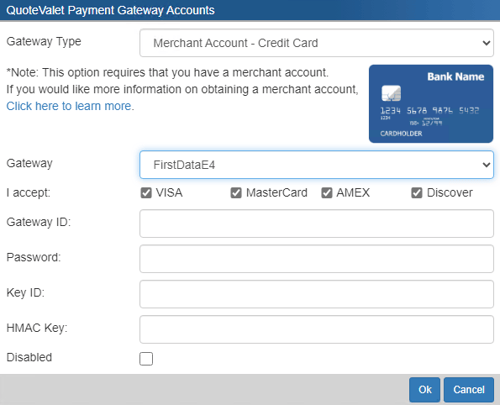
Navigate to Setup -> Options -> QuoteValet -> Payment Processing and click on the new  button to configure a new gateway. The window pictured below will open. Select FirstDataE4 from the Gateway dropdown menu.
1. Login into your First Data Global Gateway E4 account: https://globalgatewaye4.firstdata.com
2. On the right hand side of the screen under "Tasks" click on "Terminals".
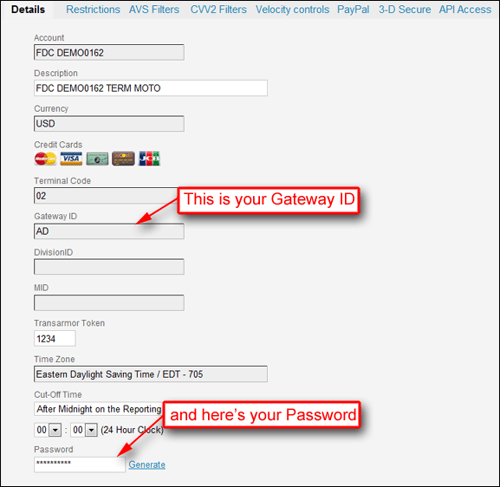
3.On the following screen, click on the terminal which will open the "Details" screen.
4.Scroll down and find your "Gateway ID" and enter this ID into QuoteWerks.
5. Further down, you'll see an areas where you can view and/or generate your password. If there is no password, generate one. Once the password is available, enter the password into QuoteWerks.
6. Next, click on the "API Access" tab.
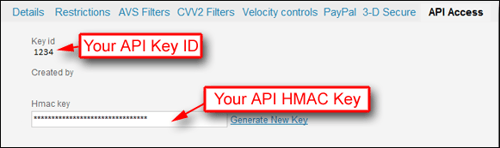
7. Generate the HMAC key by clicking on "Generate New Key".
8. Click on "Update".
9. Once you click update you will be taken back to the terminals screen. Go back to the "API Access" tab and to retrieve your HMAC key and Key ID. Enter these fields into QuoteWerks.