
When this is enabled, View Products/Create Products/Modify Products/Delete Products rights can be individually granted for each Product Data Source per User or per Group.
When you first enable this feature, no Users/Groups will have access to any of the existing Product Data Sources (PDS). The one exception is that users with Master Rights will always have full rights to the Product Data Sources. To assign Product Data Sources rights for each user/group you will need to select the Products -> Setup Product Data Sources menu, and edit each existing Product Data Source and specify which Users/Groups have access to each Product Data Source.
Only users with Master Rights can assign PDS rights while editing the PDS. If a user without Master Rights edits a PDS, the user will be able to see all the assigned rights but will not be able to change them. When creating a new Product Data Source, rights can be assigned by a user with or without Master Rights, however, when the user that creates the PDS later edits the PDS, the user will not be able to change them.
Enabling Individual Product Data Source Level Security
1. To enable Individual Product Data Source Level Security navigate to Setup -> Options -> Security and check the checkbox next to Enable individual Product Data Source security as seen below.

2. Navigate to the product data source you would like to secure by going to Setup -> Product Data Sources. Click on the data source and hit the  [Edit] button.
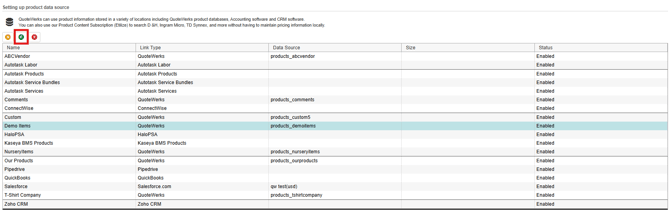
3. Click the Next button three times until you are on the Set Access Rights step of the Product Data Source Wizard.
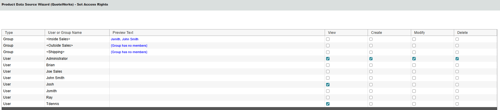
4. Use the checkboxes to assign rights to each user or group as you deem necessary.
5. Click Next and then Finish to apply the set access rights.
Product Data Source Product Rights
The following information covers product data source product rights.
‘View’ Rights
Granting the user/group this right will enable the user to view the products in the product lookup window and in general the ability to access the information in this Product Data Source (PDS).
‘Create’ Rights
Granting the user/group this right will enable the user to create products in this PDS. This right, for example, is required for a user to be able to import products into a PDS.
‘Modify’ Rights
Granting the user/group this right will enable the user to modify existing products in this PDS. This right, for example, is required for a user to be able to run an import that updates products in the PDS rather than create products. With this right, the user can also edit the product from the Product Lookup window.
‘Delete’ Rights
Granting the user/group this right will enable the user to delete existing products in this PDS. This right, for example, is required for a user to be able to run an import that deletes all the existing products in the PDS before starting the import. With this right, the user can also delete a product from the Product Lookup window.
Tips on Assigning Rights
Some operations require a combination of PDS rights. For example, in order to run a product import that updates existing products and appends products that do not already exist would require both Modify and Create rights. Also, when for example Modify rights are granted to a user/group, you will notice that the ‘View’ rights are automatically assigned. The same applies with Create and Delete rights. The concept is that the right to ‘View’ is the base right that is required before the rights of Create/Modify/Delete can be granted.
When assigning PDS rights it is strongly recommend that you assign these rights to groups rather than individual users as it will be much easier to manage these rights. This way when adding a new user, you can simply assign the user to an existing group, and the user will have rights to multiple Product Data Sources without the administrator having to manually grant the user access to each PDS.
Please keep in mind when assigning rights that complications can occur. For example, if a bundle is created that uses products from Product Data Source A and B and a user does not have ‘View’ access to Product Data Source A, then when that bundle is added to the quote by that user, the product from Product Data Source A will not be added and an error message will be displayed. The same concepts apply to Configuration Items, Required Items, Optional Items, etc.
Security Hierarchy for PDS Product Rights
|
'View' Right hierarchy Individual PDS Security is ENABLED |
Result |
| Starts with | NOT GRANTED |
| If User belongs to a group that has View Rights assigned then | GRANTED |
| If User has View rights specifically assigned to User then |
GRANTED |
| If User has Master Rights then | GRANTED |
|
'View' Right hierarchy Individual PDS is NOT ENABLED |
Result |
| Starts with | GRANTED |
| If User has Master Rights then | GRANTED |
|
‘Create’ Right hierarchy Individual PDS Security is ENABLED |
Result |
| Starts with | NOT GRANTED |
| If User belongs to a group that has Create rights assigned then | GRANTED |
| If User has Create rights specifically assigned to User then | GRANTED |
| If user has Misc Access right “CannotCreateProducts” | REVOKED |
| If User has Master Rights then | GRANTED |
|
‘Create’ Right hierarchy Individual PDS Security is NOT ENABLED |
Result |
| Starts with | GRANTED |
| If user has Misc Access right “CannotCreateProducts” | REVOKED |
| If user has Master Rights then | GRANTED |
|
‘Modify’ Right hierarchy Individual PDS Security is ENABLED |
Result |
| Starts with | NOT GRANTED |
| If user belongs to a group that has Modify rights assigned then | GRANTED |
| If User has Modify rights specifically assigned to User then | GRANTED |
| If User has Misc Access right “CannotModifyProducts” | REVOKED |
| If user has Master Rights then | GRANTED |
|
‘Modify’ Right hierarchy Individual PDS Security is NOT ENABLED |
Result |
| Starts with | GRANTED |
| If User has Misc Access right “CannotModifyProducts” | REVOKED |
| If User has Master Rights then | GRANTED |
|
‘Delete’ Right hierarchy Individual PDS Security is ENABLED |
Result |
| Starts with | NOT GRANTED |
| If User belongs to a group that has Delete rights assigned then | GRANTED |
| If user has Delete rights specifically assigned to User then | GRANTED |
| If User has Misc Access right “CannotDeleteProducts” | REVOKED |
| If User has Master Rights then | GRANTED |
|
‘Delete’ Right hierarchy Individual PDS Security is NOT ENABLED |
Result |
| Starts with | GRANTED |
| If User has Misc Access right “CannotDeleteProducts” | REVOKED |
| If User has Master Rights then | GRANTED |