
QuoteWerks integrates seamlessly with TD SYNNEX, a global leader in IT distribution, to streamline the purchasing process for resellers and businesses. With TD SYNNEX’s online ordering functionality, QuoteWerks users can access real-time product information, place orders directly with TD SYNNEX, and manage their purchases without leaving the software. This integration helps eliminate manual data entry, reduce errors, and speed up the procurement cycle.
Here’s how TD SYNNEX Online Ordering works in QuoteWerks:
- Real-Time Pricing and Product Availability: As you create quotes or purchase orders in QuoteWerks, you can pull up-to-date product pricing and availability data directly from TD SYNNEX’s catalog. This ensures that the pricing you provide to your customers is accurate and reflects the most current market conditions, helping you offer competitive quotes with confidence.
- Direct Order Submission: Once you've finalized the products in your QuoteWerks document, you can seamlessly submit your order directly to TD SYNNEX with just a few clicks. No need to navigate away from QuoteWerks or enter the data into a separate system—your order is instantly transmitted to TD SYNNEX for processing, saving you time and reducing the risk of mistakes.
- Order Status and Tracking: After submitting your order to TD SYNNEX, QuoteWerks allows you to easily track its status and receive updates about shipping and delivery times. This ensures you stay informed throughout the process, helping you manage customer expectations and maintain up-to-date order records.
- Streamlined Purchasing Workflow: By using TD SYNNEX’s online ordering within QuoteWerks, you eliminate the need for manual data entry, reduce the possibility of errors, and ensure a smooth and efficient purchasing process from start to finish. This integration helps improve productivity and accuracy in managing your inventory and orders.
Overall, TD SYNNEX Online Ordering in QuoteWerks simplifies the procurement process by providing real-time product data, direct order submission, and easy tracking of your purchases. Whether you’re placing a one-time order or managing ongoing relationships with TD SYNNEX, this integration makes it easier to maintain accurate, up-to-date records and streamline your ordering process.
Setup
Select the Setup -> Options-> Real-time option. On this window, select the TD SYNNEX North America. Scroll down to the Online Ordering Section of the page.
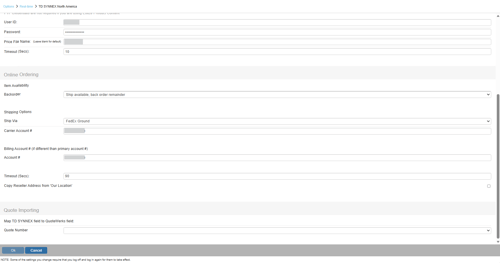
On the TD SYNNEX Online Ordering Options window you can specify the default settings for the Online Ordering feature. These settings mostly control the defaults used when placing the order on the TD SYNNEX Online Order Form described later.
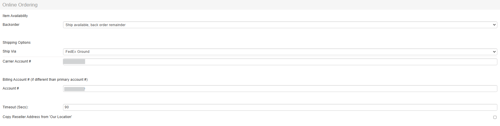
Item Availability
Backorder
This option determines how backordered items are handled. You can choose to have each backordered item shipped as they become available or wait until all items are available and then ship the complete order.
Shipping Options
Ship Via
Here you can select your default shipping carrier. The available options will vary depending on your country. For example, Purolator shipping options are available for Canadian users.
Carrier Account #
If you would like TD SYNNEX to provide your shipping carrier account # to your carrier for shipping rather than charging the shipping to your TD SYNNEX account, you can specify your shipping carrier account # here.
Billing Account # (if different than primary account #)
Account #
Here you can assign a different TD SYNNEX account number specifically for billing, so that the billing terms for that account will apply to online orders. If left blank, all orders will be billed to the account number listed on the primary TD SYNNEX tab.
Timeout (Secs)
This is used to adjust the amount of time QuoteWerks waits for a response after submitting an order. It takes TD SYNNEX longer to process an order request, so the timeout value for the online ordering is typically set to a larger number than the real-time pricing timeout. The default is 90 seconds.
Copy Reseller Address from ‘Our Location’
This option will automatically copy the address from the Company tab of the Setup -> Options menu in QuoteWerks to the Reseller tab when you place an order.
You are now ready to begin using the Online Ordering Module with TD SYNNEX. See Ordering from TD SYNNEX for next steps.