
The Ingram Micro quote importer enables you to pull in quote information from quotes that were created on the Ingram Micro website using the account you have configured in the QuoteWerks real-time setup. This is useful as you do not need to copy and paste product and cost information from the Ingram Micro website - you can directly import this information into QuoteWerks by simply searching by the quote or reviewing a list of quotes loaded from the Ingram Micro website.
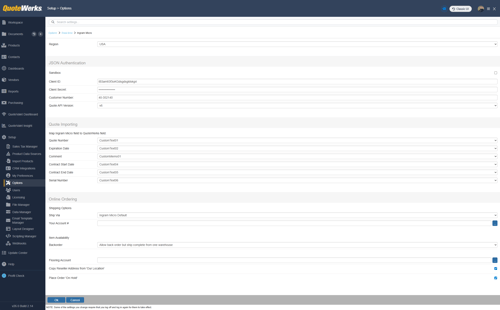
To setup the integration navigate to Setup -> Options -> Real-time -> Ingram Micro. Input your credentials and under the Quote Importing section select which QuoteWerks fields you would like to map to the available fields retrieved from Ingram Micro. This includes the Quote Number, Expiration Date, Comment, Contract Start and End Dates, and Serial Number.
1. To begin, create a quote on the Ingram Micro website using the account tied the credentials you have used to authenticate in the QuoteWerks Real-time setup.
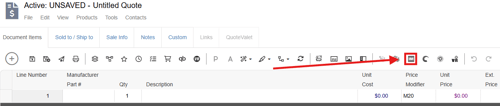
2. Login to QuoteWerks, open a quote, and click on the Ingram Micro Quote Importer button  on the Grid Toolbar.
3. This opens the Ingram Micro Quote Importer window. Here you will want to input the quote number and click on the  button to search for your quote. Alternatively, you can click on Request Quotes From Ingram Micro.
4. Select the quote you wish to import and it will appear on the right side of the window.
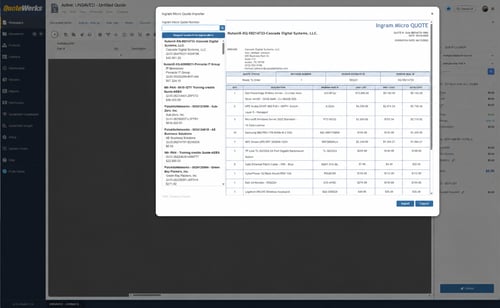
NOTE: You can resize the Quote Importer window by click and dragging the bottom right-hand hand corner of the window.
5. To import the quote information into your open QuoteWerks quote click on the import button. This will populate the fields on the quote with the information from your Ingram Micro quote.
6. You can now follow the normal quote creation and delivery process.