
This topic covers how to set up QuoteValet payment processing to work with Alternative Payments. To set up the integration, you will need your Alternative Payments Client ID and Client Secret. Follow the instructions below to obtain your Client ID and Client Secret and configure the payment gateway in QuoteWerks.
1. Obtain your Client ID and Client Secret by following the steps on the Alternative Payments website here.
2. Open QuoteWerks, navigate to Setup -> Options -> QuoteValet -> Payment Processing, and click on the new  button to configure a new gateway. The window pictured below will open. Select Alternative Payments from the Gateway dropdown menu.
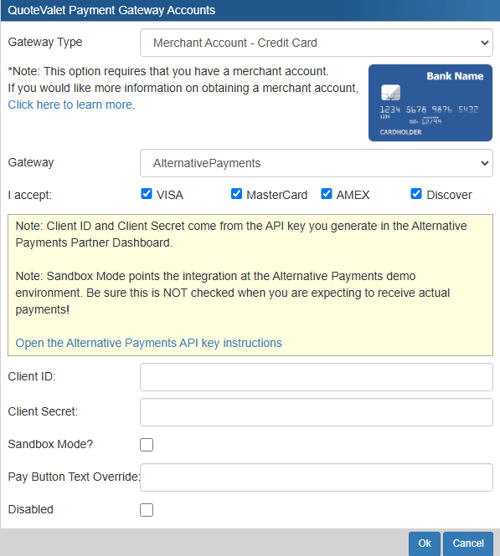
3. Insert your Client ID and Client Secret where instructed. You can also toggle sandbox mode, enter a pay button text override, and disable the integration if you would like to do so.
4. Click OK and the gateway will then be configured for use.