
This topic covers how to set up QuoteValet payment processing to work with PayFlowPro. To setup the integration, you will need 4 required pieces of information.
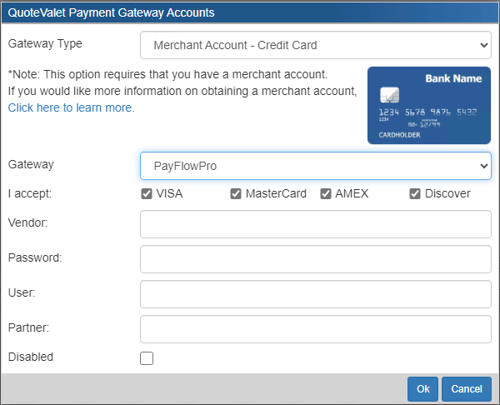
Navigate to Setup -> Options -> QuoteValet -> Payment Processing and click on the new  button to configure a new gateway. The window pictured below will open. Select PayFlowPro from the Gateway dropdown menu.
-
The Login ID you created when you registered the account is the vendor. Add this to the Vendor field in QuoteWerks.
-
The password you utilize to login to your account should be added to the Password field in QuoteWerks.
-
For User, if you have set up one or more additional users on the account that are authorized to process transactions, enter in the ID of that user. However, if you have not setup additional users on the account, the User field is the same as the Vendor field and enter that value into QuoteWerks.
-
The Partner field is the ID provided to you by the authorized PayPal Reseller who registered you for the SDK. If you purchased your account directly from PayPal, set PayPal as the partner.
TIP: You can find the User if you log into your PayFlow Pro account and click Account Administration then Manage Users.