
When your team uses Document Templates to build repeatable quotes, it is often useful to include more products or services in the template than will ultimately be quoted. The Delete Zero Quantity Line Items feature makes this approach practical by letting you quickly clean up the quote before it is delivered.
QuoteWerks recommends using templates with potential products or services set to a quantity of zero, then adjusting the quantities and removing the unused items when the quote is ready.
Where is Delete Zero Quantity Line Items located?
In QuoteWerks, the feature is available from the Document Items area of the quote, in the grid toolbar above the line-item grid.
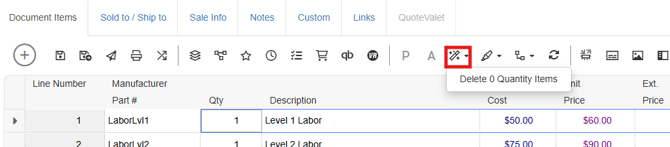
The Document Items tab is where products and services are added, quantities are adjusted, and the quote's line items are managed.
Look for the Delete Zero Quantity Items toolbar button after you have finished setting the quantities for the quote.
How does it work?
The command provides a quick way to clean up a quote by removing line items whose quantity is zero.
For example, suppose a template contains:
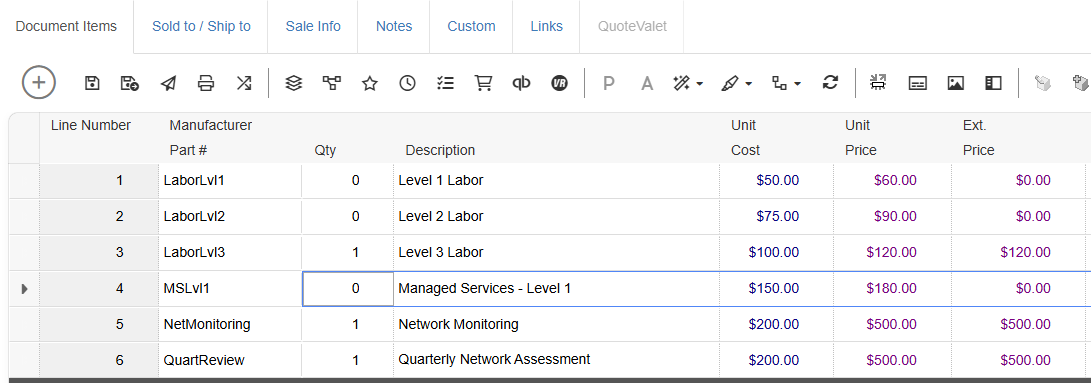
After selecting Delete Zero Quantity Items, the items with a quantity of zero are removed from the quote. The resulting quote contains only the items that have been given a quantity greater than zero.
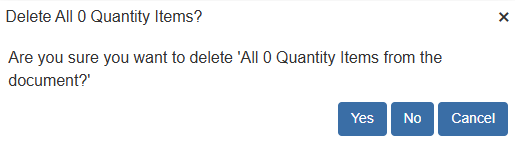
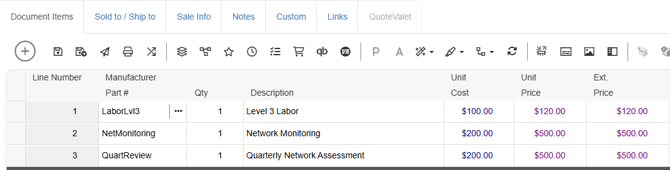
This saves you from manually finding and deleting each unused line item. This is a way to create a template containing potential products with zero quantities, set the quantities needed for the current quote, and then remove the zero-quantity items.
What happens to zero-quantity items?
The zero-quantity line items are removed from the quote.
That distinction is important. They aren't simply hidden or left sitting in the document with a quantity of zero. The cleanup action removes those unused line items from the quote, leaving the items that you actually intend to quote.
Because line items are the products and services that make up the quote, removing the unused lines helps ensure the final customer-facing document contains only the intended offerings.
Using It with Document Templates
This capability becomes particularly useful when paired with Document Templates.
A template can contain a predefined collection of products, services, headings, comments, and other quote information. QuoteWerks notes that templates can serve as the starting document for new quotes and gives the example of a template containing predefined header lines, comments, and products with zero quantities.
This creates a simple choose-what-you-need workflow.
Instead of starting with a blank quote and adding every product or service individually, your team can start with a template containing the possible items for that type of quote. The salesperson then changes the quantities for the items that apply and removes everything that remains at zero.
Recommended workflow
A practical workflow looks like this:
- Start with a Document Template containing possible items.
Build the template with the products and services that might commonly be included in that type of quote. Items that aren't always needed can start with a quantity of zero.
- Set quantities for the products and services being quoted.
Adjust each applicable line item to the quantity required for the specific customer and opportunity.
- Leave unused products at zero.
There's no need to manually delete each product while you're building the quote. Items that aren't needed can remain at their zero quantity while you work.
- Remove the remaining zero-quantity items before delivering the quote.
Once the quote is complete, use Delete Zero Quantity items to remove the unused lines and produce a clean final quote.
Why this workflow matters
One of the biggest advantages is reducing the risk of accidentally quoting something that wasn't intended.
Imagine a template contains ten products because those products represent the possible components of a particular solution. A salesperson needs only four of them for a specific customer.
With a blank-quote workflow, the salesperson has to remember which four products to add.
With a template-based workflow, the salesperson starts with all ten, sets the four applicable products to their required quantities, leaves the other six at zero, and then removes the zero-quantity items before sending the quote.
That final cleanup step creates an important safeguard: the template can be comprehensive without the customer receiving a comprehensive list of everything the template contains.
It also makes templates easier to maintain. You can design a template around the possible components of a common quoting scenario rather than creating a separate template for every combination of products.
A simple pattern for repeatable quoting
The combination of Document Templates + quantities + Delete Zero Quantity Items creates a straightforward quoting pattern:
Start broad → select what applies → remove what doesn't → deliver the final quote.
This approach lets your sales team take advantage of standardized templates without turning those templates into rigid one size fits all quotes. The template provides the repeatable starting point, while quantities determine what applies to the current opportunity. The Delete Zero Quantity Items feature then provides the final cleanup step before the quote reaches the customer.
Most importantly, it helps create a deliberate checkpoint between building the quote and delivering the quote reducing the chance that unused products or services make their way into the customer's final proposal.