The Grid Toolbar is a collection of buttons above the document grid. These buttons perform a wide range of functions and each of them are described below.
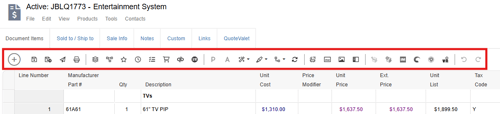
 Add New Line - clicking this button opens the add new line menu where you can add the following type of lines: product/service, blank line, comment, heading, formula, subtotal, running subtotal, summary line, % discount, or % charge.
 Save - saves the currently open document.
 Save as Revision - saves the document as a new revision.
 Deliver - opens the Print, Share, Publish, Deliver document window.
 Print - opens the Print, Share, Publish, Deliver document window.
 Bundles - opens the bundles window.
 Configurator - opens the configurator.
 Best - refreshes pricing with the best pricing available from selected vendors.
 Latest - refreshes pricing with the latest pricing from the vendor associated with the line item.
 Compare - allows you to compare pricing across selected vendors and choose which pricing to use on the quote.
 Purchasing - opens the Purchasing window.
 Export to QuickBooks - opens the export to QuickBooks Online Window.
 VendorRFQ - opens VendorRFQ.
 Properties - opens the Edit Formula Line window.
 Attributes - opens the Edit Line Attributes window.
 Wizard Actions - allows you to delete zero quantity items.
 Highlight - opens a dropdown that allows you to highlight lines in different colors.
 Set Dependent Quantities - opens a window for you to set dependent quantities for an item.
 Refresh Item Details - opens a window where you can update line item details with current information from the selected product database.
 Product Sourcing Panel - opens the Product Sourcing Panel and retrieved information for products available in Etilize.
 Toggle Description Preview Panel - opens the Description Preview Panel for the selected item where you can review and edit the items description.
 Toggle Picture Panel - opens a panel where you can add or remove pictures or videos associated with a line item.
 Toggle Item Panel - opens a panel where you can view all available fields associated with the selected item.
 Edit Shipping Rate Item - opens the Edit Shipping Rate Item window.
 Add Shipping Rate Line Item - opens the add shipping rate item window where you can request rates from shipping providers and add them to the quote.
 Import Ingram Micro Quote - opens the Ingram Micro Quote Importer window.
 Import TD SYNNEX Quote - opens the TD SYNNEX Quote Importer window.
 Import Dell Premier Order Requisition - opens the Import Dell Premier Order Requisition window where you can create a requisition with Dell and import the quote items.
 Add Item to RFQ or More Vendors to Bid - opens the VendorRFQ window where you can add the item to a new RFQ or invite more vendors to bid.
 Undo - undoes the last action.
 Redo - redoes the last action.
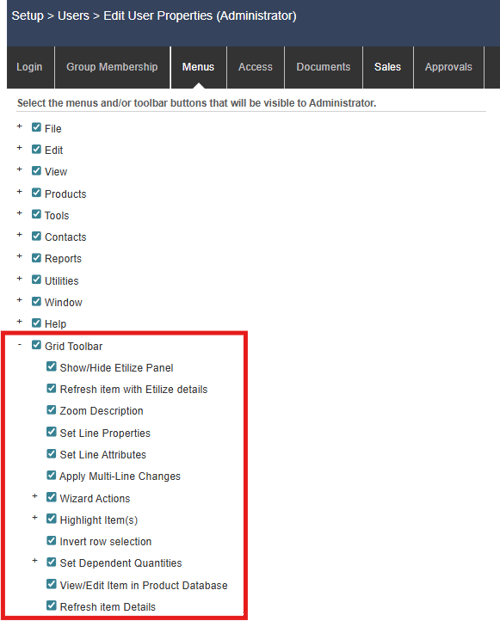
Controlling Access to Grid Toolbar Icons
Note that you can determine which of these Grid Toolbar icons are available to a user by navigating to Setup -> Users -> Edit user Properties-> Menus. Here you can select or deselect any Grid Toolbar icons you would like to show/hide from the selected users.