
The QuoteWerks built-in leasing payment calculator simplifies the process of creating quotes and proposals with various leasing options instead of purchasing the entire total outright. All leasing companies are supported, they simply need to be setup in QuoteWerks. Once you have setup your rate cards in QuoteWerks, you can add leasing payments to your quotes from the Sale Info tab.
To setup default leasing options navigate to Setup -> Options -> Leasing.
IMPORTANT: If you are using GreatAmerica and have a Real-time module, you will setup the Real-time Leasing Integration in the Real-time setup window.
Once you have setup one or multiple leasing companies in QuoteWerks, you can set a default for the leasing options to be used on quotes. These options will be used on the quotes created in QuoteWerks, but can be changed on a per quote basis.
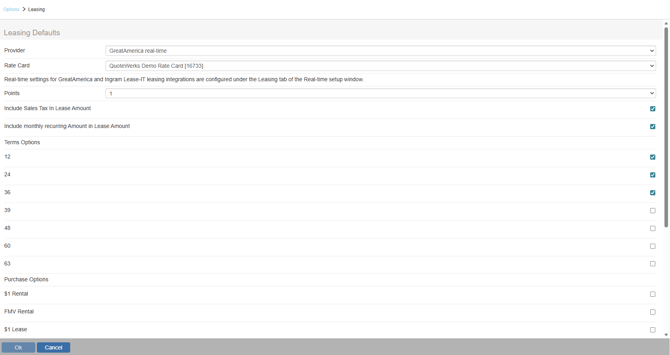
Provider
Select the default provider you have created in QuoteWerks from the drop-down list.
Rate Card
The Rate Card drop-down will let you select the default rate card to use for this provider.
Points
Users can choose the default points the dealer receives.
Include Sales Tax in Lease
Check this box to include tax as part of the lease calculation.
Include Monthly Recurring Amount in Lease Amount
Check this box to include any monthly recurring charges as part of the lease calculation.
Terms Options
The options listed here are the monthly payment options and range from 12-63 months. You can select as many options for the quotes as you would like for each provider you have setup.
Purchase Options
The Purchase Options include $1 Rental, FMV (Fair Market Value) Rental, $1 Lease, and FMV (Fair Market Value) Lease
Advanced Payment Options
The Advanced Payment Options include 0,1, or 2 months. This calculates the total as if the customer paid in advance for 0, 1, or 2 months.
Options
The Lease payment Option Display Macro enables users to modify the text that is used to display the lease payment options. By default it will display the lease amount, the purchase option(s), monthly payments, payment amount, advance payments. Users can adjust this text to fit their specific quotes.
Click [OK] after you have set your defaults to complete and save the defaults.
See also: