
QuoteWerks Web Requirements
-
QuoteWerks Web requires you have the Essentials, Balanced, or Pinnacle Edition of QuoteWerks. If you are running one of these editions all you need to do is navigate to na.quotewerks.com to access QuoteWerks Web.
-
If you are working in a hybrid environment, QuoteWerks Web requires the following:
-
Corporate Edition of QuoteWerks Desktop.
-
An active Maintenance (UMP) subscription.
-
QuoteWerks Desktop must be installed on a server or workstation. This is the master installation and is required to setup and configure QuoteWerks Web.
-
The Corporate Edition will need to be re-hosted to Microsoft SQL. The Microsoft SQL Server must be accessible by QuoteWerks Web, either on-premise, hosted by third party provider (like Microsoft Azure or Amazon RDS), or you can sign up for the QuoteWerks Database Hosting Service.
-
Depending upon your selected database hosting option and QuoteWerks Desktop use, you may need to have an external static ip address. See specific instructions for details.
-
QuoteWerks Web - The Basics
-
QuoteWerks Web enables you to access QuoteWerks anywhere, any time anywhere from your preferred web browser with limited setup required.
-
The QuoteWerks Web license is also available as an add-on license to the QuoteWerks Desktop product that gets you access to your QuoteWerks through a web browser.
-
If you have purchased Real-time Licenses, Etilize Subscriptions, and/or QuoteValet Subscriptions for QuoteWerks Desktop, these features will be accessible in QuoteWerks Web.
-
QuoteWerks Web access licensing is per concurrent user. You only need as many QuoteWerks Web licenses as users that will be using QuoteWerks Web at one time.
IMPORTANT: The following setup instructions are for advanced IT Administrators. Experience with firewalls, and Microsoft SQL Server is required to complete these steps. DO NOT attempt to follow the instructions below if you do not have the above-mentioned experience.
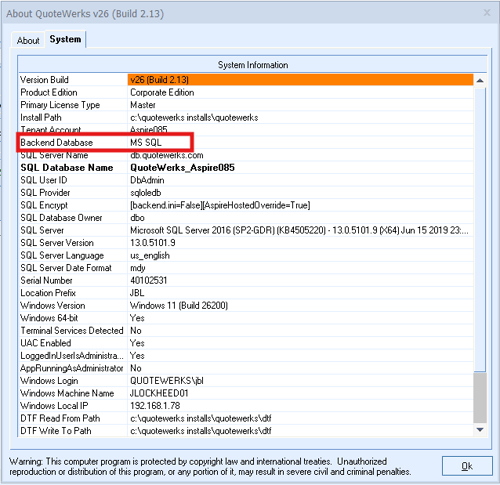
If you have an established QuoteWerks Desktop instance and are moving to QuoteWerks Web, please review the appropriate instructions outlined below. If you are unsure which backend you are currently using, you can navigate to Help -> About -> System and check the Backend Database field as shown below.
QuoteWerks Web Setup (Starting with Access Backend)
If the backend of your installation is currently Access you will need to rehost your installation from Access to Microsoft SQL. To do this, you have 3 options for hosting your QuoteWerks database. View this topic for instructions on setting up one of these options.
QuoteWerks Web Setup (Starting with Microsoft SQL Backend)
If the backend of your installation is already on Microsoft SQL, you have several options on how to proceed depending upon if you want to keep your existing SQL database or move it to a different hosted location. View this topic for instructions on setting up one of these options.